How to Fix CapCut ‘Not Available in Your Country’ [iOS & Android Guide]

Direct Answer: Why is CapCut Not Available in Your Country?
If you search for the CapCut video editor in the App Store or Google Play Store and receive an error message saying “This app is currently not available in your country or region” or “This item is not available in your country,” it means the application has been geo-blocked. This block occurs either due to direct government bans (such as in India) or because ByteDance has not officially launched the application in your local digital marketplace. Fortunately, both iOS (iPhone) and Android users can resolve this issue in minutes using safe, official region-switching methods or verified package managers. Below is the ultimate step-by-step troubleshooting guide.
Key Takeaways for Bypassing Country Restrictions
- iOS (iPhone/iPad): Resolved by temporarily changing your Apple ID country/region to a supported country like the United States or Canada.
- Android: Resolved by connecting to a VPN to access a supported Play Store cache or by downloading the official, unmodded APK file from a trusted repository like APKMirror.
- In-App Network Fix: If the app downloads but says “No Internet Connection,” use a reliable VPN to bypass local ISP server blocks.
- Security Best Practice: Never download unofficial “Pro Unlocked” APKs, as they carry high risks of data theft and spyware.
iOS Workaround: How to Change App Store Region to Download CapCut
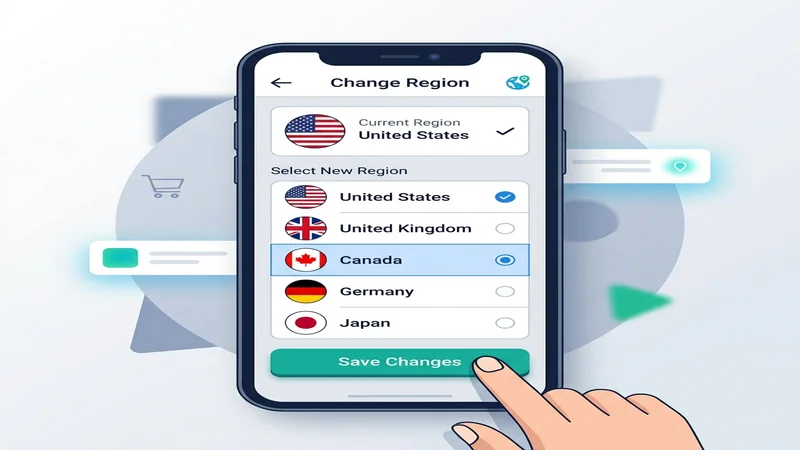
Because Apple devices do not support sideloading apps easily, the safest and most effective workaround is temporarily changing your Apple ID App Store location. Follow these steps:
- Open the Settings app on your iPhone or iPad.
- Tap on your Apple ID Name at the top of the settings list.
- Select Media & Purchases, then tap View Account (you may be asked to authenticate with Face ID or your password).
- Tap on Country/Region, then select Change Country or Region.
- Scroll down and select a country where CapCut is officially supported (we recommend the United States or the United Kingdom).
- Agree to the new Terms and Conditions.
- On the Payment Method screen, select “None” (this is crucial so you do not need a foreign credit card).
- For the billing address, enter any valid US address (you can use a random hotel address, a zip code like
90210, and a mock phone number). - Tap Next and then Done. Open your App Store, search for “CapCut”, and download it. You can switch your App Store region back to your home country after the download completes.
Android Workaround 1: Safe APK Installation (Recommended for India)
For Android users, especially in regions where the app is permanently banned (like India), changing Play Store settings can be slow. Sideloading the official application package is the fastest fix:
- Open your web browser and navigate to a trusted, safety-vetted APK mirror site (such as APKMirror or APKPure).
- Search for “CapCut” and download the latest stable release.
- Once downloaded, tap the APK file. Your phone will request permission to “Install from Unknown Sources” (allow your web browser permission).
- Follow the on-screen prompts to complete the installation.
To avoid compromised files, ensure you are utilizing only the official, unmodded versions. Check our dedicated CapCut Pro APK Download Old Versions portal for clean, pre-scanned release archives.
Android Workaround 2: VPN Play Store Cache Fix
If you prefer downloading directly from the Google Play Store, you can force the store to update its regional library by following these steps:
- Download and open a reputable VPN application.
- Connect to a server in a supported region (e.g., USA, Singapore, or Germany).
- Go to your Android phone’s Settings > Apps > Google Play Store.
- Tap Storage and select Clear Cache and Clear Data.
- Re-open the Google Play Store. It will load using the IP location of your VPN, allowing you to download CapCut officially.
How to Fix In-App “No Internet Connection” Errors
After successfully installing CapCut in a restricted region, you may open the app only to see a “No Internet Connection. Connect to the internet and try again” error when attempting to download templates, audio files, or transitions. This occurs because local ISPs block connection requests to CapCut’s media hosting servers.
To resolve this, simply open your VPN, connect to a server in a country where CapCut is legal (like Singapore or the United States), and re-open CapCut. All templates and transitions will load instantly.
Detailed Comparison of Download Workarounds
| Workaround Method | OS Platform | Difficulty Level | Security Level | Key Risk / Limitation |
|---|---|---|---|---|
| App Store Region Swap | iOS (iPhone) | Medium | High (Official) | Requires active subscriptions to be canceled first |
| Play Store Cache Reset + VPN | Android | Easy | High (Official) | Requires VPN connection during download |
| APK Mirror Sideloading | Android | Easy | Medium (Varies) | Risk of downloading modified/corrupted files from bad sites |
Frequently Asked Questions
Why doesn’t CapCut show up in my Play Store or App Store?
If CapCut does not appear, it is due to a regional restriction or a country-wide ban (such as the IT Act ban in India). The app store automatically hides applications that are geo-restricted or legally blocked in your registered country.
Is it safe to download CapCut APK files?
Yes, provided you download the official version from reputable, vetted platforms like APKMirror. Avoid third-party “mod” websites that promise free pro features, as they often inject harmful malware and tracking code into the installer.
How do I get CapCut templates to load in a banned region?
In-app assets like templates and transitions require a server connection. If you are in a banned region, you must connect to a VPN before opening CapCut to allow the app to communicate with its servers.
Conclusion
Encountering regional errors does not mean you have to miss out on the industry’s leading mobile video editor. By utilizing Apple’s region-switching feature or sideloading the official Android APK safely, you can bypass the block in minutes. For more information on compliance, data policies, and where bans are active, visit our CapCut Ban Status Monitor. If you are a new creator, check out our guide on CapCut Features and How to Use Them.
![How to Fix CapCut ‘No Internet Connection’ Error [2026 Guide]](https://capcutpro-apks.com/wp-content/uploads/2026/06/network_error_featured-768x403.webp "How to Fix CapCut 'No Internet Connection' Error [2026 Guide] 2")
![CapCut AI Editing Guide: How to Use Voice Cloning, Neural Masking & Dreamina [2026]](https://capcutpro-apks.com/wp-content/uploads/2026/06/capcut-ai-features-guide-dreamina-voice-cloning-featured-768x403.jpg "CapCut AI Editing Guide: How to Use Voice Cloning, Neural Masking & Dreamina [2026] 4")
![CapCut Pro APK v9.8.0 & Old Versions: Safe Download & Rollback Guide [2026]](https://capcutpro-apks.com/wp-content/uploads/2026/06/old_versions_featured-768x403.webp "CapCut Pro APK v9.8.0 & Old Versions: Safe Download & Rollback Guide [2026] 5")